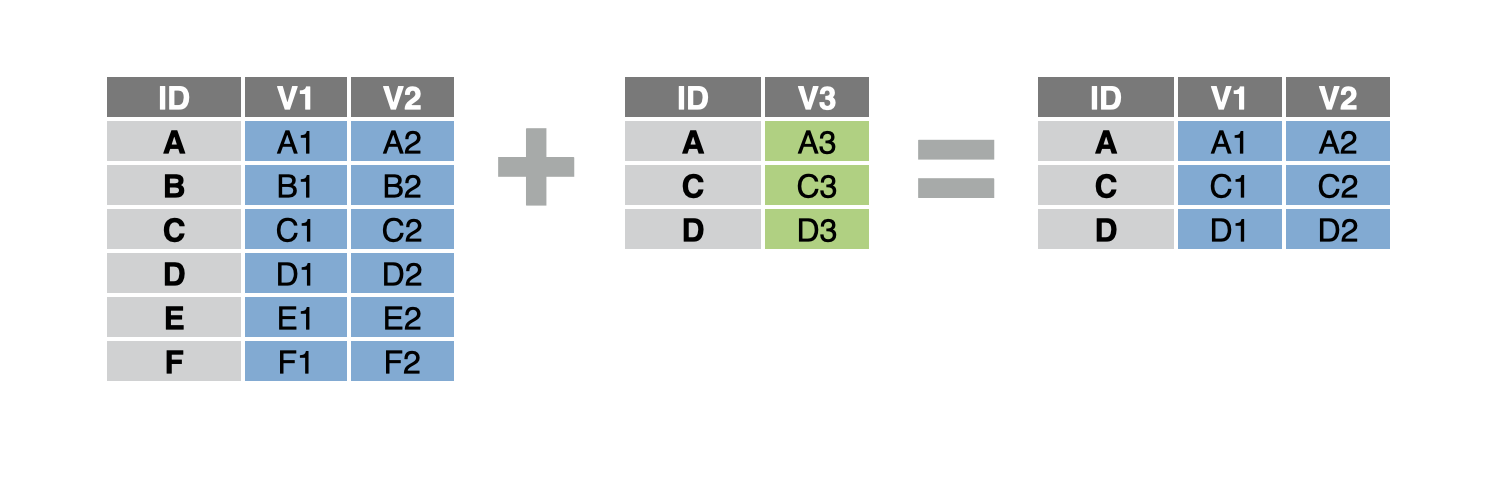
Filter one table against another (filtering join)
You want to filter a table to just the rows that would have a match in a second table, but you don’t actually want to join the two tables. This is known as a filtering “join.”
Step 1 - Ensure that your data frame is tidy with each observation in its own row and each variable in its own column.
Step 2 - Pass your data frame to dplyr::semi_join(). semi_join() will return rows from the first data frame that have a match in the second data frame.
Step 3 - Tell semi_join() which column(s) to match the data frames by. semi_join() will use the values in this column (or the combinations of values in these columns) to determine which rows have a match.
data_1 %>%
  semi_join(data_2, by = "id")
A common syntax
semi_join() uses the same syntax as other dplyr join functions, like left_join(). So we can do things like join on a combination of columns:
by = c("first_name", "last_name")
Or join on columns that have different names in each data frame:
by = c("id_table1" = "id_table2")by = c("first_name" = "first", "last_name" = "last")
Example
study tracks the experience of every patient in a clinical trial. patients provides background information, like sex, on these patients and others.
study# A tibble: 12 × 3
# Groups: ptid [4]
ptid months filt_rate
<dbl> <dbl> <dbl>
1 3 0 21.3
2 3 4.4 17.6
3 3 38.0 9.29
4 26 0 18.3
5 26 2.17 18.2
6 26 4.14 17.8
7 59 2.3 24.6
8 59 4.37 21.7
9 59 8.25 19.5
10 75 0 25.1
11 75 4.14 24.9
12 75 12.2 16.9 patients# A tibble: 8 × 3
ptid sex age
<dbl> <chr> <dbl>
1 3 M 71.7
2 7 F 69.1
3 26 M 73.4
4 33 F 69.2
5 59 F 66.7
6 64 F 63.5
7 75 F 65.7
8 110 F 63.5We want to double-check that the clinical trial used an even distribution of males and females.
First, we load the dplyr package, which contains semi_join(). Then we filter patients to just the patients that appeared in the study.
library(dplyr)
patients %>%
  semi_join(study, by = "ptid")
# A tibble: 4 × 3
ptid sex age
<dbl> <chr> <dbl>
1 3 M 71.7
2 26 M 73.4
3 59 F 66.7
4 75 F 65.7We see there is an even distribution of males and females in the clinical trial participants.
Return rows in table without a match
anti_join() is the opposite of semi_join(); it returns all rows in the first data frame that do not have a match in the second.
Filter one table against another in SAS
semi_join() and anti_join() are the equivalent of a SAS SQL procedure with a WHERE condition.
semi_join in SAS:
PROC SQL;
  SELECT *
  FROM tab_1
  WHERE EXISTS (SELECT * FROM tab_2 WHERE tab_1.id = tab_2.id);
QUIT;
anti_join() in SAS:
PROC SQL;
  SELECT *
  FROM tab_1
  WHERE tab_1.id NOT IN (SELECT id FROM tab_2);
QUIT;
In R:
data_1 %>%
  semi_join(data_2, by = "id")

data_1 %>%
  anti_join(data_2, by = "id")