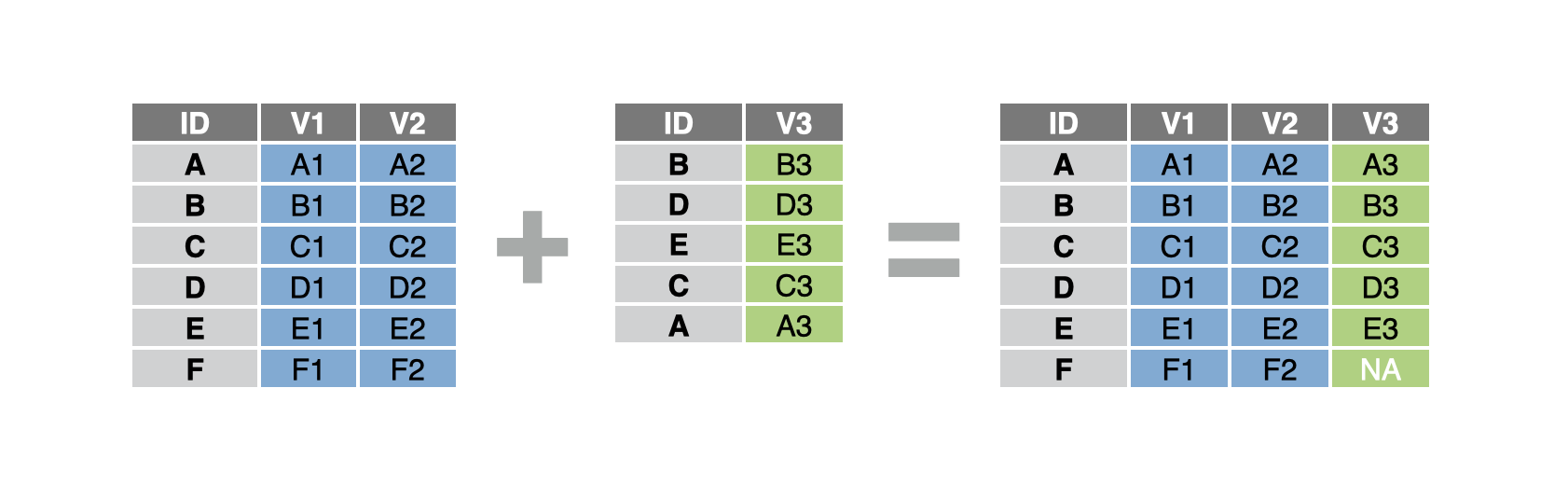
Join or merge tables
You have two tables that each describe the same observational units, e.g. the same subjects, patients, vendors, etc. You’d like to combine the two tables into a single table by matching up rows that describe the same observational unit.
Step 1 - Ensure that your data frame is tidy with each observation in its own row and each variable in its own column.
Step 2 - Pass your data frame to dplyr::left_join(). left_join() will return a copy of the first table that extends each row to include relevant information from the second table.
Step 3 - Tell left_join() which column(s) to join by. Set by to the name of the column that identifies the observational unit that each row describes. Often, this column appears with the same name in each dataset. Surround the name in quotes.
data_1 %>%
  left_join(data_2, by = "id")
Join by multiple variables
If your data uses a combination of columns to uniquely identify each observational unit, e.g. employee first name and last name, set by to a vector of the column names: by = c("first_name", "last_name").
Join on columns with different names
Sometimes an id column has a different name in the second data set. In this case, set by to a named character vector. Supply the column names from table 1 as the names, and the column names from table 2 as the values that the names are paired with, e.g.
by = c("id_table1" = "id_table2")by = c("first_name" = "first", "last_name" = "last")
Types of joins
The dplyr package provides three alternatives to left_join(). Each uses the same syntax as left_join() but returns a different combination of rows from the original datasets.
| Join type | Returns |
|---|---|
left_join() |
Every row that appears in the first (i.e. left) table, augmented with information from the second table. |
right_join() |
Every row that appears in the second (i.e. right) table, augmented with information from the first table. |
full_join() |
Every row that appears in either table, i.e. all of the rows. |
inner_join() |
Only rows that appear in both tables |
Example
study tracks patient outcomes during a clinical trial. patients provides background information on each patient. To get the full picture, we’d like to merge study and patients into a single table.
study# A tibble: 12 × 3
# Groups: pt_id [4]
pt_id months filt_rate
<dbl> <dbl> <dbl>
1 1 7.95 18.7
2 1 20.1 12.7
3 1 28.4 14.2
4 2 24.1 22.6
5 2 32.4 22.6
6 2 39.8 26.7
7 3 1.87 14.7
8 3 4.4 17.6
9 3 12.2 6.37
10 4 2.1 20.5
11 4 4.17 20.4
12 4 16.3 10.3 patients# A tibble: 4 × 3
uniq_id sex age
<dbl> <chr> <dbl>
1 1 M 64.1
2 2 F 66.6
3 3 M 71.7
4 4 F 70.2We first load the dplyr package, which contains left_join(). Then we join our data frames together by the columns that contain the patient ids. Since these columns have different names in each dataset, we use a named vector to pass the names to by.
library(dplyr)
study %>%
  left_join(patients, by = c("pt_id" = "uniq_id"))
# A tibble: 12 × 5
# Groups: pt_id [4]
pt_id months filt_rate sex age
<dbl> <dbl> <dbl> <chr> <dbl>
1 1 7.95 18.7 M 64.1
2 1 20.1 12.7 M 64.1
3 1 28.4 14.2 M 64.1
4 2 24.1 22.6 F 66.6
5 2 32.4 22.6 F 66.6
6 2 39.8 26.7 F 66.6
7 3 1.87 14.7 M 71.7
8 3 4.4 17.6 M 71.7
9 3 12.2 6.37 M 71.7
10 4 2.1 20.5 F 70.2
11 4 4.17 20.4 F 70.2
12 4 16.3 10.3 F 70.2Check for errors before you join
You can use dplyr::anti_join() to check for rows in one data frame that do not have a match in the other data frame. This is a great way to spot misspellings and other bugs that would prevent a match.
study %>%
  anti_join(patients, by = c("pt_id" = "uniq_id"))
Merging tables in SAS
full_join() is the equivalent of SAS’s PROC SORT followed by the MERGE statement in the DATA step or a PROC SQL full join. left_join(), right_join(), and inner_join() are the equivalent of PROC SQL with the join type specified. The dplyr *_join() functions do one-to-one or one-to-many merges based on the data.
In SAS:
PROC SORT data_1;
  BY join_var;
RUN;

PROC SORT data_2;
  BY join_var;
RUN;

DATA new_data;
  MERGE data_1 data_2;
  BY join_var;
RUN;
or
PROC SQL;
  CREATE TABLE new_data AS
  SELECT *
  FROM data_1 FULL JOIN data_2
  WHERE data_1.join_var = data_2.join_var;
QUIT;
In R:
new_data <-
  data_1 %>%
  full_join(
    data_2,
    by = "join_var"
  )