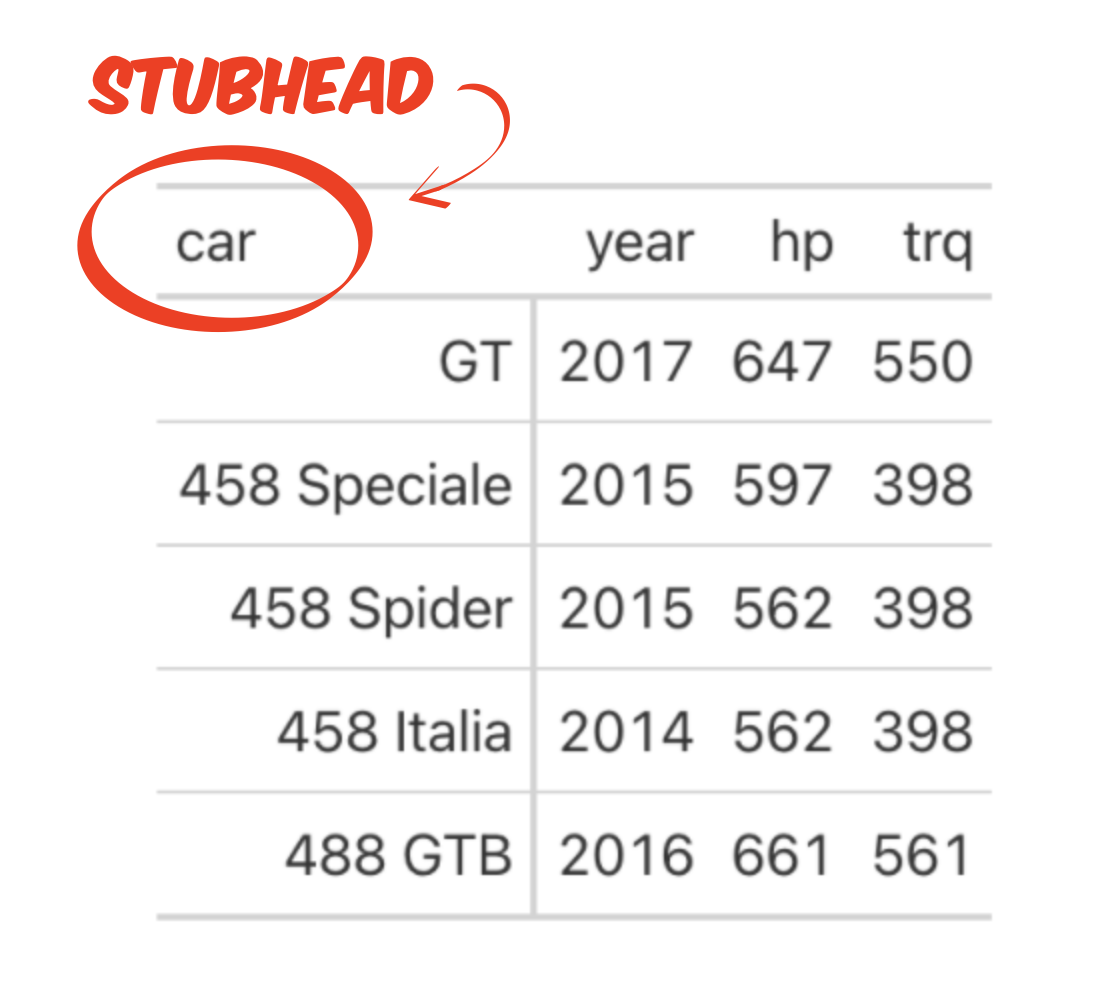
Add a label above the row names in a table for publication
You are making a table for publication, and you want to add a label above the row names, to the left of the column names. In the vocabulary of the gt package, the row names are called a stub and this type of label is called a stubhead.
Step 1 - Start with a data frame that contains the values that you want to display in the arrangement that you want to display them.
Step 2 - Use gt::gt(rowname = ) to turn your data frame into an editable, professional looking table. The rowname argument isolates the row names, which creates space for a label above them.
Step 3 - Use gt::tab_stubhead() to add the label.
data %>%
  gt(rowname = "var") %>%
  tab_stubhead(label = "Stubhead label")
Example
store_sales describes the number of various products sold at three stores during a week. gt() returns a publication ready version of table, but we are not entirely satisfied with it.
library(gt)
store_sales %>% gt()| product | store8 | store21 | store44 |
|---|---|---|---|
| Quaker Instant Grits 12 oz | 20 | 12 | 3 |
| Quaker Kids Choice 14.3 oz | 3 | 7 | 11 |
| Quick Quaker Oats 18 oz | 55 | 21 | 53 |
| Quick Quaker Oats 42 oz | 123 | 18 | 52 |
We isolate the product names from the rest of the data by identifying them as row names, but this has an unintended effect: we lose the variable name product.
store_sales %>%
gt(rowname_col = "product") | store8 | store21 | store44 | |
|---|---|---|---|
| Quaker Instant Grits 12 oz | 20 | 12 | 3 |
| Quaker Kids Choice 14.3 oz | 3 | 7 | 11 |
| Quick Quaker Oats 18 oz | 55 | 21 | 53 |
| Quick Quaker Oats 42 oz | 123 | 18 | 52 |
We replace it with a more informative stubhead label.
library(gt)
store_sales %>%
  gt(rowname_col = "product") %>%
tab_stubhead(label = "Selected Products")| Selected Products | store8 | store21 | store44 |
|---|---|---|---|
| Quaker Instant Grits 12 oz | 20 | 12 | 3 |
| Quaker Kids Choice 14.3 oz | 3 | 7 | 11 |
| Quick Quaker Oats 18 oz | 55 | 21 | 53 |
| Quick Quaker Oats 42 oz | 123 | 18 | 52 |
Refer to stubhead labels
To refer to the stubhead label(s) in gt, use the function gt::cells_stubhead(), e.g.
tab_style(
  style = cell_text(color = "blue"),
  locations = cells_stubhead()
)
Add a label above the row names in SAS
tab_stubhead() is the equivalent of SAS’s BOX= option in the TABULATE procedure.
In SAS:
PROC TABULATE DATA = data;
  CLASS col_A col_B;
  VAR col_C;
    TABLE col_A, col_B * col_C / BOX='Stubhead label';
RUN;
In R:
data %>%
  gt(rowname_col = "col_B") %>%
  tab_stubhead(label = "Stubhead label")